Introducing markdown-indent-mode
2026-03-08 #emacs
The Itch
One thing I particularly love about org-mode is org-indent-mode, which
visually indents content under each heading based on its level. It makes long
org files much easier to read and navigate.
Occasionally, I need to edit Markdown files — and every time I do, I miss that clean visual hierarchy. So I vibe-coded a first version over a weekend.
Vibe-Coding
The idea translates naturally from org-indent.el, which ships with Emacs.
Headings marked with # instead of *, same concept.
The first version worked partially, but was full of edge cases: code fences confusing the heading parser, list items indenting wrong, wrapped lines losing alignment. I kept using it day-to-day, tweaking it when something looked off, and simplifying whenever I found a cleaner approach. Eventually it reached a state I was genuinely happy with.
At that point I thought it might be useful to others too, so I decided to share it.
First Attempt: Merging into markdown-mode
My first instinct was to contribute this directly to markdown-mode, the de-facto Markdown package for Emacs, so all users could get it without installing anything extra. It turns out this is a long-anticipated feature — there have been open issues requesting it for years:
- Issue #330 (opened in 2018)
- Issue #679 (opened in 2021)
I opened a pull request to add the feature directly into markdown-mode.
Going Standalone Package
The markdown-mode maintainer reviewed the PR and suggested that this would be better as a standalone package since it would be a burden for them to maintain the new feature.
I took the suggestion, refactored the code into its own package:
markdown-indent-mode, and submitted it to MELPA.
The MELPA Journey
Submitting to MELPA was a learning experience in itself. I picked up a few tools along the way for checking Elisp package quality:
checkdoc— checks that docstrings follow Emacs conventionspackage-lint— catches common packaging issuesmelpazoid— an automated checker specifically designed for MELPA submissions
The MELPA maintainers are volunteers who typically review PRs on weekends, so the process took a few days.
What markdown-indent-mode Does
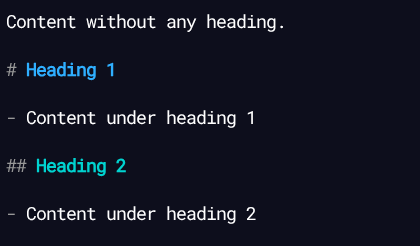
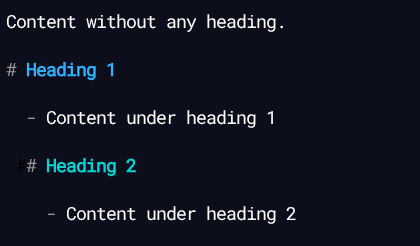
Here's what it does — nothing fancy, just the basics done cleanly:
- Uses
line-prefixandwrap-prefixtext properties for visual indentation - Content under a heading is indented according to the heading level
- Leading
#symbols are hidden - List items are indented to align with their content
- Everything is purely visual: no buffer content is ever modified
Installation
This package is available on MELPA. You can use use-package to install it and
add hook to enable it for markdown-mode.
(use-package markdown-indent-mode
  :hook (markdown-mode . markdown-indent-mode))
Or toggle it on demand with M-x markdown-indent-mode.
| Before | After |
|---|---|
 |
 |
The source is available at https://github.com/whhone/markdown-indent-mode.
If you ever find yourself editing Markdown in Emacs, give it a try and let me know what you think!