Using Caddy with Extensions on Arch Linux
2026-06-14 #linux
Contents
A recent security incident on the Arch Linux AUR (Arch User Repository) highlighted the potential risks of running community-maintained packages without thorough auditing. I don’t rely heavily on the AUR, but I do use a few AUR packages, and I carefully review PKGBUILD files whenever I update or install something new.
Currently, my Arch Linux uses four AUR packages: yay, xcaddy, bindfs, and chrome-remote-desktop. To reduce this footprint further, I decided to see if I could get rid of xcaddy while maintaining my custom Caddy setup.
The Problem with the Previous Approach
Previously, I used xcaddy to build a custom Caddy binary with both the webdav (which I use to sync my Org-mode files, as detailed in Use Syncthing with WebDAV to Sync Everywhere) and cloudflare extensions (which I use to get an HTTPS certificate for a host without a public IP). I then manually replaced the official binary at /usr/bin/caddy.
While this did the job, I was never fully satisfied with it for two reasons:
- Binary Overwrites: Every time the official
caddypackage got updated, package manager transactions would overwrite my custom binary, stripping out the extensions. - Lacking Arch Patches: Building Caddy directly via
xcaddymeant the binary did not benefit from Arch Linux-specific packaging adjustments, such as custom compilation flags or system-specific integrations.
The Solution: Arch Build System
To address this, I switched to the Arch Build System (ABS). By leveraging ABS along with git subtree, we can import the official Arch packaging repository for Caddy as a local subdirectory in a configuration repository. This lets us edit the PKGBUILD file to inject our custom plugins directly into the official compile step, maintaining a binary that benefits from official Arch patches while avoiding AUR helpers for Caddy.
Implementation with `git subtree`
1. Initial Setup
First, set up a dedicated directory to manage your custom package builds:
mkdir abs-builds && cd abs-builds

git init
git commit --allow-empty -m "Initial commit."

# Link your private remote backup repository
# git remote add origin git@github.com:yourusername/abs-builds.git
2. Clone Upstream Package via Git Subtree
Next, pull down the official Caddy package source as a local subdirectory using git subtree:
# Pull down official Caddy as a local subtree directory
git subtree add --prefix=caddy https://gitlab.archlinux.org/archlinux/packaging/packages/caddy.git main --squash
3. Injecting Custom Extensions & Committing Local Changes
Edit prepare() and check() in caddy/PKGBUILD. We can inject the custom plugins directly into the build tree by modifying prepare() to generate the plugin registry file and download module dependencies, and check() to clean the modcache.
Here is the patch/diff to apply to caddy/PKGBUILD:
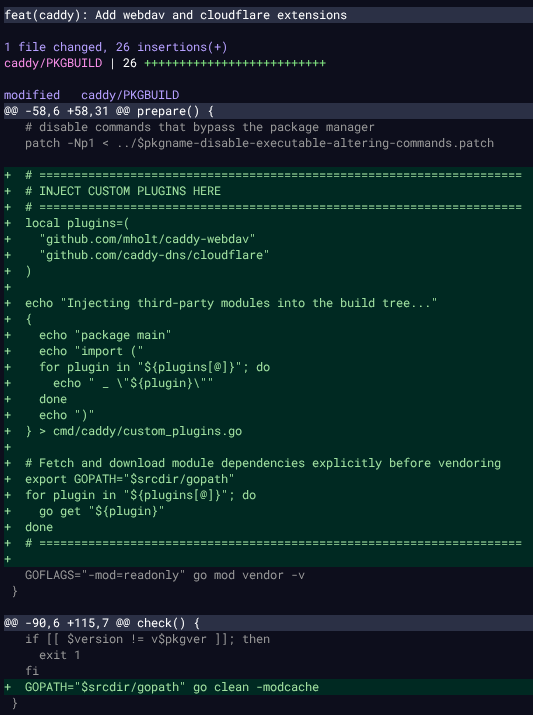
Compile, install, and verify that the custom modules are included:
# Compile and install
cd caddy
makepkg -si

# Ensure dns.providers.cloudflare and http.handlers.webdav are included.
caddy list-modules
Return to the root directory and commit the changes:
cd ..
git add caddy/PKGBUILD
git commit -m "feat(caddy): inject cloudflare and webdav modules into build tree"
4. Pacman Configuration
To prevent pacman from replacing our custom package with the official upstream binary during system updates, add caddy to the IgnorePkg list in /etc/pacman.conf:
IgnorePkg = caddy
5. Updating the Repo from Upstream
When the official caddy package is updated, running a system upgrade (pacman -Syu) will warn you that a newer version of Caddy is available. Since we added it to IgnorePkg, pacman will not replace it automatically. We then manually pull down upstream updates and compile them:
# 1. Fetch, squash, and merge upstream updates into your subfolder
git subtree pull --prefix=caddy https://gitlab.archlinux.org/archlinux/packaging/packages/caddy.git main --squash

# 2. Fix any merge conflicts in caddy/PKGBUILD (keep your plugin blocks right before go mod vendor)

# 3. Finalize the merge commit if conflicts occurred
git add caddy/PKGBUILD
git commit -m "chore(caddy): merge upstream changes and resolve build blocks"

# 4. Compile and install again
cd caddy
makepkg -si
Conclusion
Adopting the Arch Build System allowed me to eliminate xcaddy from my list of AUR packages, lowering my security footprint without sacrificing the custom capabilities of my Caddy installation. It integrates custom extensions with native Arch Linux package management. While it does require manual merges when updating, the process is straightforward and keeps the system clean.