Refining Org-mode Deadlines
Contents
For a long time, I didn’t use deadlines in Org-mode at all. However, over the past year (or perhaps even longer, though I forget exactly when), I have found myself relying on them more and more. Deadlines have quietly become the backbone of my day-to-day productivity.
A New Prioritization Hierarchy
In my earlier post on task management workflow, my day-to-day focus was heavily centered around scheduled dates and TODO states. Today, my prioritization hierarchy has fundamentally evolved to:
Deadline + Priority > Schedule > TODO States
- Deadlines + Priorities represent my primary focus. Deadlines show what must be delivered and when, while priorities help determine which deadline to tackle first. Together, they serve as the main driver for my planning.
- Scheduled dates are reserved for habits, recurring chores, or temporary “snoozing” (hiding tasks until they need to be revisited).
- TODO States (like
NEXTorPROG) act as a backlog of next actions. If my deadline and prioritized items are blocked or completed, I look here to see what to pick up next.
Default Org Agenda View
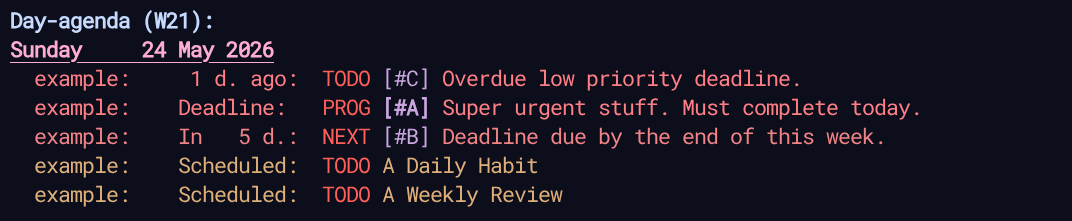
However, the default deadline behavior in Org-mode didn’t really work for me. Out of the box, deadlines look identical to scheduled tasks, and the short warning window makes them hard to plan around.
Here is the default Org agenda view:
Customized Org Agenda View
To support this deadline-first workflow, here are two tricks I used to turn Org-mode deadlines into a powerful planning tool.
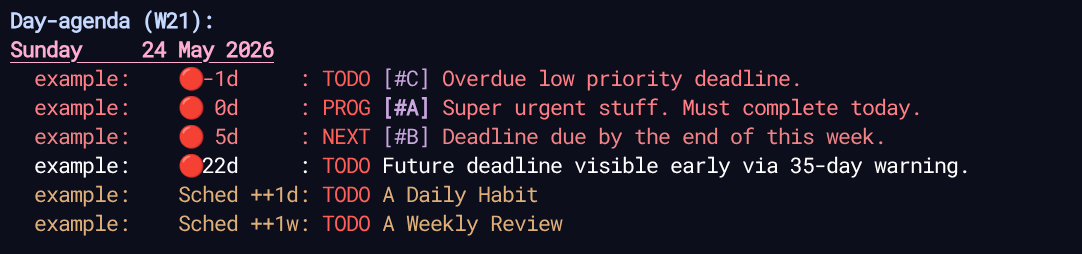
Here is the customized Org agenda view:
Trick 1: Visual Deadlines with Custom Leaders and Sorting
In the Org agenda view, distinguishing scheduled tasks from deadlines at a glance is surprisingly difficult. Because they share a similar layout and color palette, a looming deadline can easily get lost in a sea of routine scheduled chores.
To solve this, I customized the “leaders” (the prefix text shown in the agenda) by prepending a bright red circle emoji (🔴) to all deadline items. This makes them immediately pop out.
Also, sort deadeline at the very top lines by customizing the org-agenda-sorting-strategy to clearly separate “deadline” and “scheduled” items.
Here is the Elisp configuration I use:
;; Shorten the leaders to reserve spaces for the repeater.
(setq org-agenda-scheduled-leaders '("Sched" "S.%2dx"))
(setq org-agenda-deadline-leaders '("🔴 0d" "🔴%2dd" "🔴-%1dd"))

(defun my/org-agenda-repeater ()
  "The repeater shown in org-agenda-prefix for agenda."
  (let ((pom (org-get-at-bol 'org-marker)))
    (if (or (org-get-scheduled-time pom) (org-get-deadline-time pom))
        (format "%5s: " (or (org-get-repeat) ""))
      "------------")))

;; Add repeater and effort to the agenda prefixes.
(setq org-agenda-prefix-format
      '((agenda . " %i %-12:c%?-12t%s%(my/org-agenda-repeater)")))

;; Add deadline-up to agenda to separate schedule and deadline.
(setq org-agenda-sorting-strategy
      '((agenda deadline-up habit-down time-up priority-down category-keep)))
This is an extension of my previous post on distinguishing repeated tasks. By shortening the scheduled leaders, we free up horizontal space for the repeater interval. The addition of the 🔴 emoji ensures that any item with an active deadline immediately commands attention.
Trick 2: Expanding the Warning Window to a Month
By default, Org-mode starts warning you about a deadline 7 days in advance. While a week sounds reasonable, in practice, it is often too short.
When a deadline suddenly appears on your agenda with only 7 days to go, it can easily disrupt your cadence. Since 7 days technically translates to only 5 working days, you might already be fully committed to other urgent tasks. Instead of helping you plan, a short warning window simply induces stress.
To fix this, I increased the default warning period from a week to a month (35 days, or 5 weeks):
(setq org-deadline-warning-days 35)
With a 35-day warning window, upcoming major deadlines are visible on the agenda far in advance. This gives me ample time to adjust my weekly plan and budget resources before the deadline becomes urgent.
Of course, not every task warrants a month-long warning. For minor tasks, you can override the default warning period on a per-item basis. For instance, you can use the -3d syntax to only trigger a warning 3 days prior:
DEADLINE: <2026-06-19 Fri ++28d -3d>
Conclusion
I used to find schedules and deadlines somewhat overlapping in Org-mode. However, separating them into distinct roles, by using custom leaders for urgency and a longer warning window for planning, has made my agenda a lot easier to parse. It is a simple config tweak, but it has made my planning a bit smoother.